I first typed repeat tag into Google at 11 pm, after a friend’s YouTube video got 40 views and mine got 6. I wanted a magic list of tags to copy and paste. What I found was a mix of tag generator pages, RapidTags results, and a lot of confusing advice. This guide is what I wish I had read that night. It explains the meaning of repeat tag, how YouTube tags work, and how Indian creators can use them honestly.
Quick Answer: What is repeat tag?
Repeat tag is a search phrase creators use when they want a YouTube tag generator or want to reuse relevant video tags. YouTube calls them video tags. They help with misspellings and context, but the title, thumbnail, and description matter more for discovery.
By the way, I am a performance marketer and media buyer in Jaipur, and I look at search data every single day. Everything below comes from testing, reading YouTube’s own help pages, and making plenty of mistakes on my own channel.
What Is Repeat Tag and How Do YouTube Tags Work?
What Is Repeat Tag?
Here is the honest answer. Repeat tag is not a button inside YouTube Studio. Nobody at YouTube named a feature “repeat tag.” It is a phrase people type into Google, and from what I see in search results, it leads mostly to tag generator tools like RapidTags.
So when someone searches for repeat tag, they usually mean one of three things:
- They want a tool that gives them tags for a video.
- They want to reuse the same tags on a new upload.
- They saw a tool called RapidTags and are trying to find it again.
Knowing which one you are matters, because the right action is different for each.
Is Repeat Tag an Official YouTube Feature?
No. YouTube’s help documentation calls these video tags. It says tags are mainly useful when your video content is commonly misspelled, and that titles, thumbnails, and descriptions do more for discovery.
I like starting here because many third-party pages promise that the right tags will push your video to the top. That claim is not supported by YouTube itself. If a page says tags alone will rank your video, close the tab.
How Do YouTube Tags Work?
Think of tags as small labels stuck on the back of your video. Viewers rarely see them. They give YouTube search a little extra context about what your video covers.
Tags Help With Misspellings
Say you upload a recipe video about “paneer tikka.” Some viewers will type “panner tika.” A tag with that spelling can catch those searches. This is where tags are actually useful.
Tags Add Context
A word like “jaipur” in a travel vlog tells YouTube which city you mean. A single word can mean different things, so a tag clears that up. Your title and description do the same job, only louder.
How to Find Repeat Tag Ideas With a YouTube Tag Generator
A YouTube tag generator pulls suggestions from search data so you do not have to guess. Popular options include RapidTags, TubeRanker, and TunePocket. I treat them as examples, not endorsements, because each one gives slightly different results.
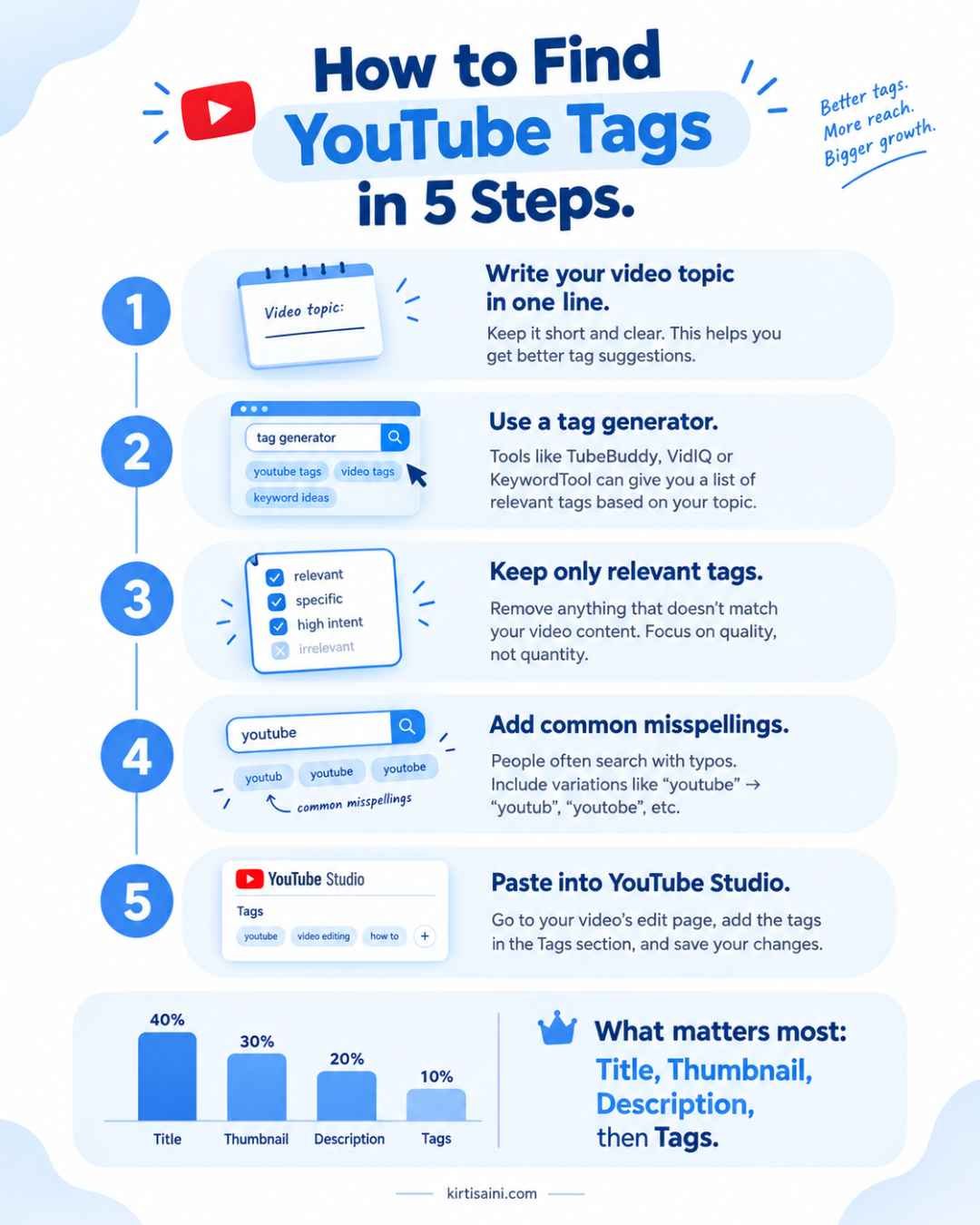
Here is the process I follow:
- Write down the exact topic of your video in one sentence.
- Type the main phrase into a tag generator.
- Copy only the suggestions that truly describe your video.
- Add two or three misspellings if people commonly get the word wrong.
- Paste the final list into YouTube Studio under the video details section.
The fourth step takes ten seconds, yet most people skip it.
Use YouTube Autocomplete as a Free Check
Open YouTube and start typing your topic. The suggestions that drop down are real search queries from real viewers. I use YouTube autocomplete as a free second opinion. If a tag from a generator never appears in autocomplete, I think twice before keeping it.
Look at Competitor Tags Carefully
A tag extractor can show the tags another creator used. I look at them for ideas only. Copying a whole list is a mistake, because their video is not your video.
Can You Use the Same Repeat Tag on Every Video?
This is the question hiding behind most searches for repeat tag, so let me answer it plainly. Yes, but only for tags that are true for every video.
When I started my channel, I pasted the same 15 tags under every upload. My cooking video and my study vlog shared tags like “daily vlog” and “motivation.” None of it was wrong in a harmful way, but none of it helped either. The videos were not about the same thing.
Now I use a simple split:
- One or two channel tags that describe the whole channel, such as a series name.
- Six to eight video tags that describe only that upload.
When a Repeat Tag Makes Sense
A repeat tag works for a series name, your channel name, or a recurring topic. If you post a weekly “Jaipur Street Food” series, that phrase belongs on every episode.
When a Repeat Tag Hurts
Reusing tags becomes a problem when they are irrelevant. Adding “viral” or “trending” to a video that is neither does nothing for you. It only makes your metadata look careless.
Repeat Tags vs Unique Tags
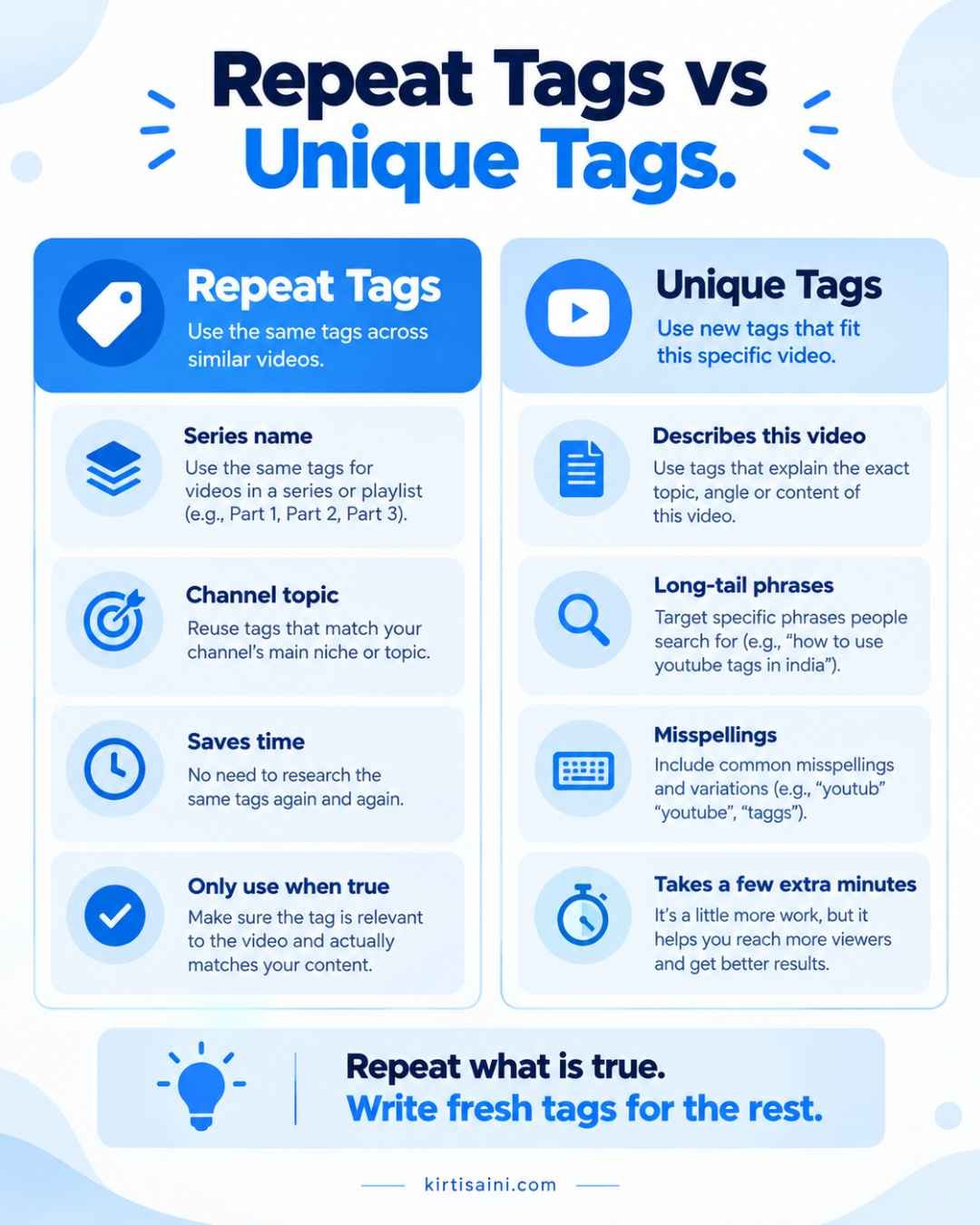
Here is how I compare them in real life.
Repeat tags
- Save time when you upload often.
- Keep a series connected.
- Stop being useful if you copy them blindly.
Unique tags
- Describe the specific video.
- Capture long-tail keywords like “how to edit reels on phone for beginners.”
- Take a few extra minutes to research.
My rule is simple. Repeat what is true, and write fresh tags for everything else.
What Is the Best Repeat Tag Strategy for Indian Creators?
Which YouTube Tags Work for English, Hindi, and Hinglish?
India is a multilingual search market. The same viewer might search in English on Monday and in Hinglish on Friday. That is why one repeat tag in one language is rarely enough.
English Tags
Use these when the topic is technical or global. Examples: “youtube seo tips,” “video editing tutorial,” “how to start a youtube channel.”
Hindi Tags
Use Hindi when your video is spoken in Hindi and your viewers search that way. Examples: “यूट्यूब चैनल कैसे बनाएं” or “वीडियो एडिट करना सीखें.” Make sure the tags match your language, not just the trend.
Hinglish Tags
Hinglish is Hindi written in English letters, and it is how many people actually type on their phones. Examples: “youtube channel kaise banaye,” “video edit kaise kare.” This is one of the most useful ideas for YouTube tags India creators, because it matches real search habits.
Indian Location Terms
If your video is local, say so. A tag like “jaipur cafe vlog” or “rajasthan travel guide” gives context that a general tag cannot. Add these only when the video really covers that place.
Do YouTube Tags Still Matter in 2026?
They matter a little, and that is the honest version. I would rather tell you the truth than sell you a shortcut.
YouTube says tags play a minimal role in discovery. What carries more weight is how people react to your video. Do they click? Do they keep watching? Does your thumbnail make a clear promise and does your title match it?
Title, Description, and Thumbnail First
Spend your energy in this order:
- A clear title with the main phrase near the start.
- A helpful description that explains the video in the first two lines.
- A thumbnail that is easy to read on a small phone screen.
- Tags last, to cover misspellings and context.
For thumbnails, I have written about AI-generated images for YouTube thumbnails, which may save you design time.
Organic Tags vs Paid Promotion
If a video is not getting views, tags will not fix that alone. Some creators and small brands pair their videos with paid reach. If that is your plan, my guide on PPC for small businesses in India explains how to think about ad spend without wasting money.
Other Platforms Worth Knowing
Video is not the only place Indian audiences listen. Audio ads are growing too, and I covered that in my post on Spotify Ads in India.
What Are the Most Common Repeat Tag Mistakes?
I have made all of these, so no judgment here.
- Adding irrelevant tags. A cooking video should not carry “gaming” just because gaming gets searches.
- Keyword stuffing. Thirty tags is not better than eight good ones.
- Copying a competitor’s entire list. Their video and yours are different.
- Using Hindi or Hinglish when the video is in English. Viewers will leave, and that hurts your watch time.
- Treating tags as the main plan. They are a small part of YouTube SEO.
Two Quick Tips You Can Use Today
Quick tip 1: Start with the real topic of your video, then build close variations around it. YouTube recommends accurate tags, and they are most useful for commonly misspelled terms.
Quick tip 2: Do not spend all your effort on tags. Put more attention into your title, thumbnail, description, and the viewing experience, since YouTube names those as the stronger discovery signals.
Quick Poll: Where Do You Stand?
Which one sounds like you?
- A) I paste the same tags on every video.
- B) I write fresh tags each time.
- C) I use a mix of both.
- D) I never add tags at all.
Tell me your letter in the comments. I read every reply, and I will answer with a suggestion for your next upload.
Frequently Asked Questions About Repeat Tag
What is a repeat tag?
A repeat tag usually refers to finding or reusing relevant YouTube video tags. It is not YouTube’s official name for a feature. YouTube calls them video tags.
Can I use the same YouTube tags on multiple videos?
You can reuse tags that genuinely describe more than one video, such as a channel topic or series name. Avoid copying unrelated tags just because another upload used them.
Do YouTube tags help videos rank?
They give extra context, but YouTube says tags play a minimal role compared with titles, thumbnails, and descriptions.
What is the best YouTube tag generator?
Popular tools include RapidTags, TubeRanker, TunePocket, and vidIQ. Compare their suggestions and keep only the tags that accurately match your video.
Should Indian YouTubers use Hindi tags?
Use Hindi or Hinglish variations when viewers actually search for your topic that way. Do not add language variations that do not describe the video.
Final Thoughts on Repeat Tag
That night when I first searched repeat tag, I wanted a shortcut. What I learned is that tags are a helpful detail, not a secret key. Use a YouTube tag generator for ideas, keep only what is true, and put your real effort into a clear title, a strong thumbnail, and a useful description.
If you have a repeat tag question I did not cover, drop it in the comments. I will add it to this guide so the next creator does not have to figure it out alone at 11 pm.